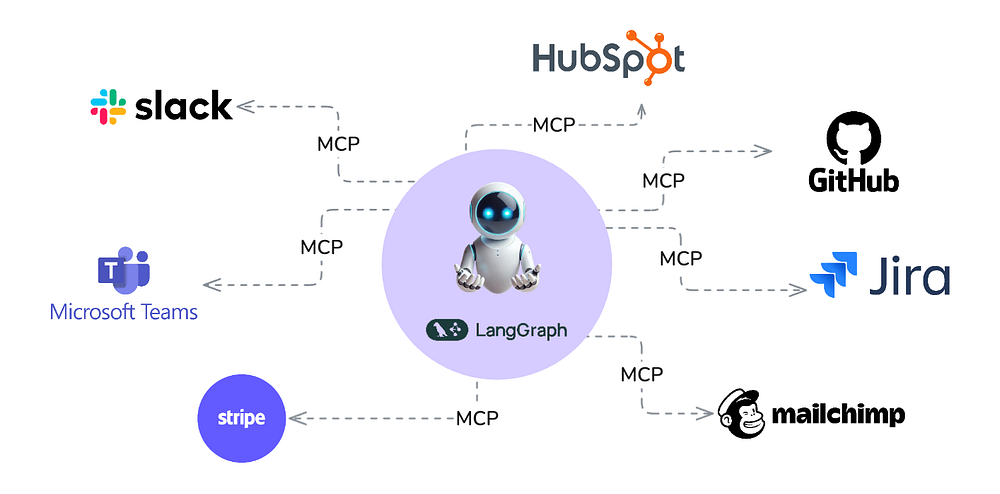
Model Context Protocol (MCP) is an open protocol that enables seamless integration between LLM applications and external data sources and tools. Whether you're building an AI-powered IDE, enhancing a chat interface, or creating custom AI workflows, MCP provides a standardized way to connect LLMs with the context they need.
Think of MCP like a USB-C port for AI applications. Just as USB-C provides a standardized way to connect your devices to various peripherals and accessories, MCP provides a standardized way to connect AI models to different data sources and tools.
LangGraph is a framework designed to enable seamless integration of language models into complex workflows and applications. It emphasizes modularity and flexibility. Workflows are represented as graphs. Nodes correspond to actions, tools, or model queries. Edges define the flow of information between them.
LangGraph provides a structured yet dynamic way to execute tasks, making it ideal for writing AI applications involving natural language understanding, automation, and decision-making.
In this earlier article we enhanced LangGraph's retrieval agent template to develop and deploy an AI solution.
In this work, we combine LangGraph with MCP to build our own Universal Assistant. You can access the code here.
Before we get into it, let's experience what we built in this demo:
Note: In the next blog, we explore how to enhance the capabilities of this assistant even further, so that we can plug any OpenAPI spec for an API and connect it!
Implementation
For our universal assistant we implement a multi-agent pattern as follows:
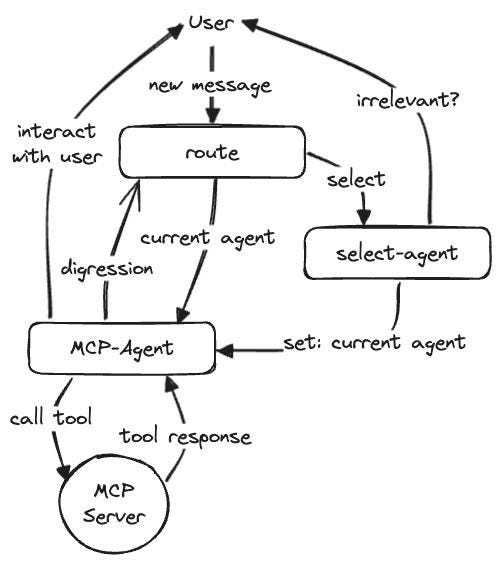
Assistant receives the user message and decides the agent to use. The agent node decides the right tool to use, and calls the tool on the MCP server. Since all our agents are based on MCP, a single MCP-Agent node is sufficient for LLM based orchestration, and another single node is sufficient to work with MCP servers to invoke their tools.
Our Implementation Walk-thru
There are 3 main parts to our implementation:
- Building the Router
- The Assistant
- A generic MCP wrapper
Building the Router
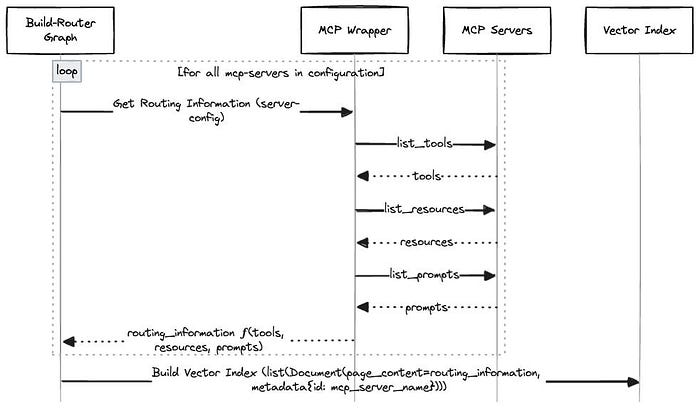
Our graph to build the router is implemented in build_router_graph.py. It collects routing information based on tools, prompts, and resources offered by each MCP server using our mcp_wrapper.py. It indexes this routing information for each server in a vector database.
The Assistant
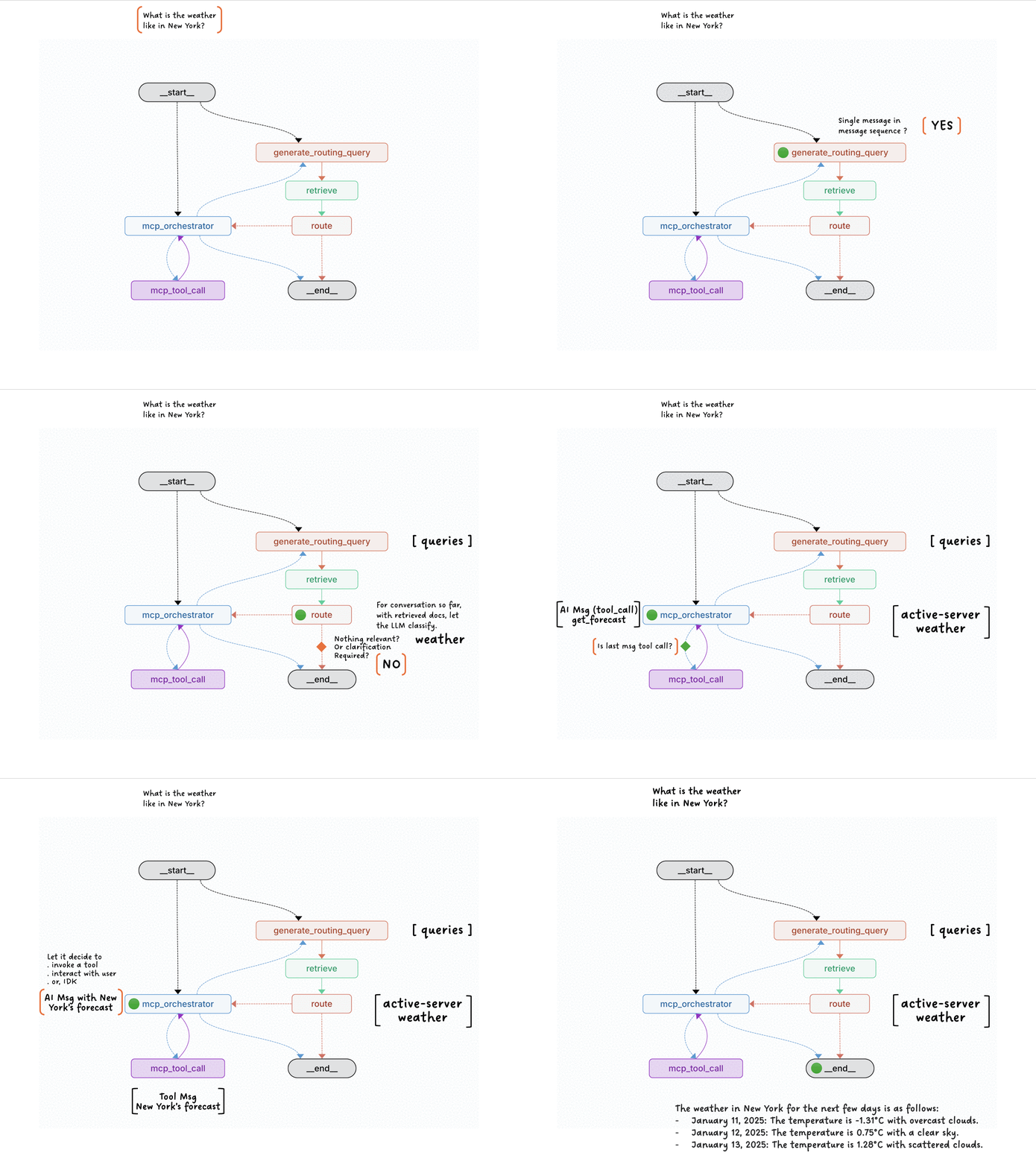
The assistant graph is implemented in assistant_graph.py. The following animation describes the role of various nodes and the flow of control thru it, with the help of an example
A Generic MCP Wrapper
mcp_wrapper.py employs a Strategy Pattern using an abstract base class (MCPSessionFunction) to define a common interface for executing various operations on MCP servers. The pattern includes:
- Abstract Interface
MCPSessionFunctiondefines an async__call__method as a contract for all session functions.
- Concrete Implementations
RoutingDescriptionclass implements fetching routing information based on tools, prompts, and resources.GetToolsclass implements fetching tools for the MCP server and transforming them to the format consumable by LangGraph.RunToolclass implements invoking a tool on MCP server and returning its output.
- Processor Function
applyserves as a unified executor. It:- Initialises a session using
stdio_clientfrommcplibrary. - Delegates the actual operation to the provided
MCPSessionFunctioninstance viaawait fn(server_name, session).
- Extensibility
- New operations can be added by subclassing
MCPSessionFunctionwithout modifying the core processor logic. for e.g. we should be able to add support for getting tools and executing tools using this pattern.
Setting it up
Create and activate a virtual environment
git clone https://github.com/esxr/langgraph-mcp.git
cd langgraph-mcp python3 -m venv .venv
source .venv/bin/activate
Install Langgraph CLI
pip install -U "langgraph-cli[inmem]"
Note: "inmem" extra(s) are needed to run LangGraph API server in development mode (without requiring Docker installation)
Install the dependencies
pip install -e .
Configure environment variables
cp env.example .env
Add your OPENAI_API_KEY, GITHUB_PERSONAL_ACCESS_TOKEN etc. to the .env
Note: We have added support for Milvus Lite Retriever (support file based URI). Milvus Lite won't work on Windows. For Windows you may need to use Milvus Server (Easy to start using Docker), and change the
MILVUS_DBconfig to the server based URI. You may also enhance the retriever.py to add retrievers for your choice of vector databases!
Conclusion
We can now try to connect it to services we use daily (e.g. JIRA, Slack, other channels etc) to help make our daily tasks more efficient!
We tackle that in the following blog: