
Flutter is one of the most trending platforms for mobile development in 2020. It is one of the easiest ways to code complex applications with good UI.
To gain experience in Flutter, we decided to do recreate our former app, Pivot, in flutter, with an added feature, the global chatroom, where users could hang out and talk about different topics.
We decided to use a simple Cloud Firestore backend. The full project can be accessed using the link below:
A mobile student portal for ICAS made with Flutter Place where students can view their timetable and major updates and…
Setup
Before using Firebase, it has to be configured. First, it has to be added to the flutter project.
A file named "google-services.json" will be downloaded and added to the project folder.
After that, the pubspec.yaml file has to be changed to add Firebase and Cloud Firestore plugins.
NOTE: The latest version of dependencies might have to be changed in the future.
The details of firebase authentication are discussed in a separate blog, but they can be found in the Github repo as well.
Chat Backend
The backend is pretty simple. It consists of a Collection of Chats.
Schema
Each chat entry contains:
content: The contents in the chat
idFrom: Id of the user who submitted the chat
timestamp: Time at which the message was sent
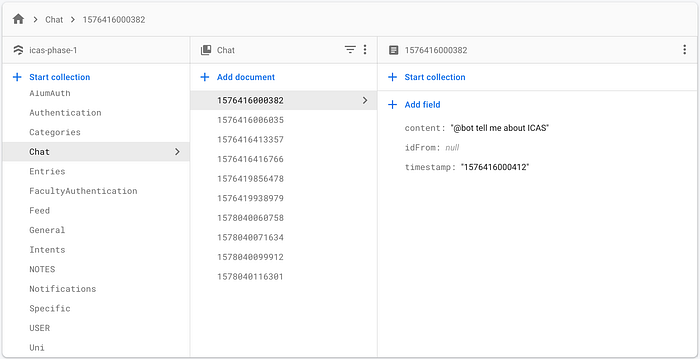
Whenever a new chat is sent, it will be added to the Chats collection.
Frontend
Now that the backend is established. It is time to map each document in the chat collection with its frontend counterpart.
Its basic structure is given below.
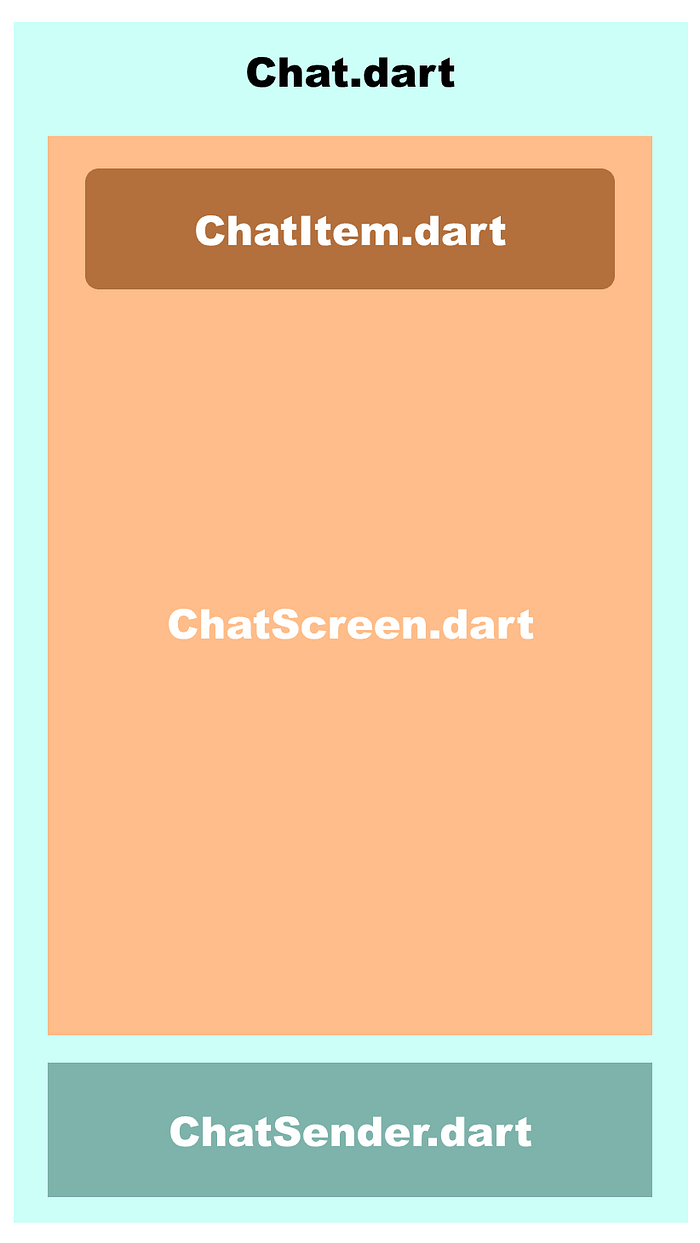
NOTE: Click on the subheadings to directly go to the code.
Chat
This component is responsible for managing the entire state of the chat. It has two sub-components:
- ChatScreen.dart
- ChatSender.dart
ChatScreen
This sub-component is responsible for loading the chat from the firebase backend and displaying a list of ChatItem s.
A StreamBuilder has been used for the process so that the chat screen is instantly updated when an entry is added, changed or deleted in the backend.
ChatItem
This is the GUI counterpart of every Chat( document) in the Chats collection.
Defining the ChatItem separately increases the modularity of the code. We can change the appearance of each ChatItem with ease.
ChatSender
This component allows the user to send their chat.
It consists of a TextField and an IconButton. The TextField is assigned a TextEditingController to manage its UI state and update it with user input.
Sending Message to Firebase Collection
When the button is clicked, the sendMessage() method is called, which in turn takes the current value of the TextEditingController and calls the onSendMessage() method.
void sendMessage() {
    onSendMessage(textEditingController.text);
}
The onSendMessage() method accepts a String as a parameter and adds it to the ' Chat' collection in Cloud Firestore.
Conclusion
This concludes a simple and easy implementation of a global chatroom using Cloud Firestore and Flutter.